
We have implemented a new consignment software as of October 2025.

Consignors can access their Ricochet account through the web (karis.ricoconsign.com) or the Ricochet Go app (Google Play or App Store). Note that you can access more information through the website than you can the app.
Account Setup
You must have and use the email address that you have on file with us at Karis. To log in for the first time and set up a password, use your email address and “Forgot your password?” below the Login button.
If this does not work or your need to provide us with your email address, contact us.
Password Requirements
Please make sure your password meets the following requirements, or you will not be able to login.
Minimum length: 12 Characters
At least one of each:
Capital letters: A-Z
Lowercase letters: a-z
Numbers: 0-9
Special characters: !-+
Passwords are sensitive data and should not be shared.
Account Details
Once logged in, the Dashboard will provide you with a summary or overview of your account. You can manage and update your address and contact information using the Profile tab.
You are responsible for monitoring the 60-day and 90-day consignment periods and picking up your items if you do not want them reduced or donated to Karis. Ricochet will automatically apply 25% off at 60 days (this is called the aged price) and mark your items as Expired (meaning they are the property of Karis) at 90 days from the date your items were entered.
If viewing your account on the website, you can select the three lines to the far right to get more detail and see the Received and In-Stock date as well as the aged price once your items are reduced.

When inventory has exceeded 90 days, items will show as expired, which means the item is the property of Karis. If the item is expired and sold by Karis with 100% of the sale price going to Karis, the item will be marked as Sold Expired. You can see this in the Ricochet Go app example to the right.
If you pick up an item before the price is reduced or before the item expires, we will park it as Picked Up.
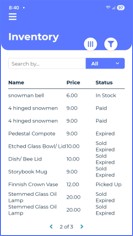
The Payout tab shows the items sold and payout amount for the month. If you select the three vertical lines in the circle (only in Ricochet Go app), you can select different column headers to show.
There is also a Payout History tab to show each monthly payout.

Thank you for your patience during this transition. We hope you enjoy the new software. We feel Ricochet provides you with the information you were missing with our previous software.